Automatic DBS Update Service Checks For Employers
Employment Tools checks the DBS Update Service for your subscribed employees every single day, giving you continuous monitoring without the repetitive manual work.
Set each employee up once and let our system keep checking in the background. If a status changes, your team can be alerted so you can take action quickly.
Continuous DBS monitoring without the daily admin
A DBS Update Service status check only tells you the position at the time you carry it out. Employment Tools removes the manual work by carrying out a fresh check for your subscribed employees every day.
Checked every day
We automatically carry out a fresh DBS Update Service status check every day for each employee you place under monitoring.
No more remembering to check
Remove another recurring compliance task from your team’s workload and let Employment Tools handle it automatically.
Know when something changes
If a result indicates that a new DBS check may be required, your team can be notified so you can act quickly.
What Is The DBS Update Service?
The DBS Update Service is an online subscription service for people who hold an eligible Standard or Enhanced DBS certificate. It allows an employer or organisation, with the individual’s permission, to carry out an online status check to see whether the certificate is still current.
The Update Service costs £16 a year for paid workers, and is free for volunteers.
A DBS Update Service employer check does not provide a brand-new certificate. Instead, it checks whether new information has been identified since the original certificate was issued. If the certificate remains current, the employer may be able to continue relying on it rather than requesting another DBS application.
This can be particularly useful for organisations with employees who need ongoing DBS screening, because it can reduce unnecessary repeat applications and help employers maintain confidence that the information they originally reviewed remains up to date.
Employers need to carry out status checks to find out whether a certificate has changed. Employment Tools removes that repetitive work by automatically checking subscribed employees every day.
How a DBS Update Service employer check works
The employee has an eligible DBS certificate
The Update Service is available for eligible Standard and Enhanced DBS certificates, not Basic DBS checks.
The certificate is added to the Update Service
Once subscribed, an eligible employer can carry out status checks with the individual’s consent.
The employer checks whether it is still current
The online result tells the employer whether new information has been identified since the certificate was issued.
A DBS Certificate Must Be Added Within 30 Days
To use the DBS Update Service, the certificate must be added to the service within 30 days of it being issued. Miss the deadline and the certificate cannot be added later – a new DBS check would need to be carried out.
How Often Should Employers Check The DBS Update Service?
There is no fixed DBS rule requiring employers to carry out Update Service status checks every week, month or year. Instead, organisations should decide on an appropriate schedule based on the risk associated with the role, regulatory requirements and their own safeguarding policies.
However, every status check only tells you the position at the time it is carried out. By not checking regularly, there is the possibility of missing out on an important update.
The problem is that increasing the frequency of manual DBS Update Service employer checks also increases the amount of administration for your team. Checking hundreds of employees regularly can quickly become another repetitive compliance task – unless you’re using Employment Tool’s automatic checker!
DBS recommends considering factors such as the nature of the role, level of potential risk, regulatory requirements and safeguarding policies.
What if you could check every day without doing any more work?
That is exactly what our automatic DBS Update Service checker is designed to do.
Once an employee is placed under monitoring, Employment Tools carries out a fresh DBS Update Service status check every day. There is no recurring checking task for your team to remember.
Why Keep Carrying Out DBS Update Service Checks Manually?
A manual DBS Update Service employer check may only take a few minutes, but those minutes quickly add up when you are responsible for dozens, hundreds or even thousands of employees.
Someone has to remember which certificates need checking, log in, carry out each status check, review the result and repeat the process again later.
Employment Tools removes that repetitive administration. Add an employee to monitoring once and our system checks their DBS Update Service status automatically every day.
Your team can spend less time carrying out routine checks and more time dealing with the things that actually need their attention.
You do the work
- Remember when employees need checking
- Log in and carry out checks manually
- Repeat the process for every employee
- Review and record each result
- Decide how often to repeat the checks
- Risk checks being delayed or forgotten
We do the checking
- Set the employee up once
- Automatic DBS Update Service checks
- Fresh status check carried out every day
- Continuous monitoring in the background
- Your team can be alerted when something changes
- Far less repetitive compliance administration
Ready to Make Employment Checks Easier?
Register for free, book a demonstration or speak to our team about your organisation’s requirements.
How Our Automatic DBS Update Service Checks Work
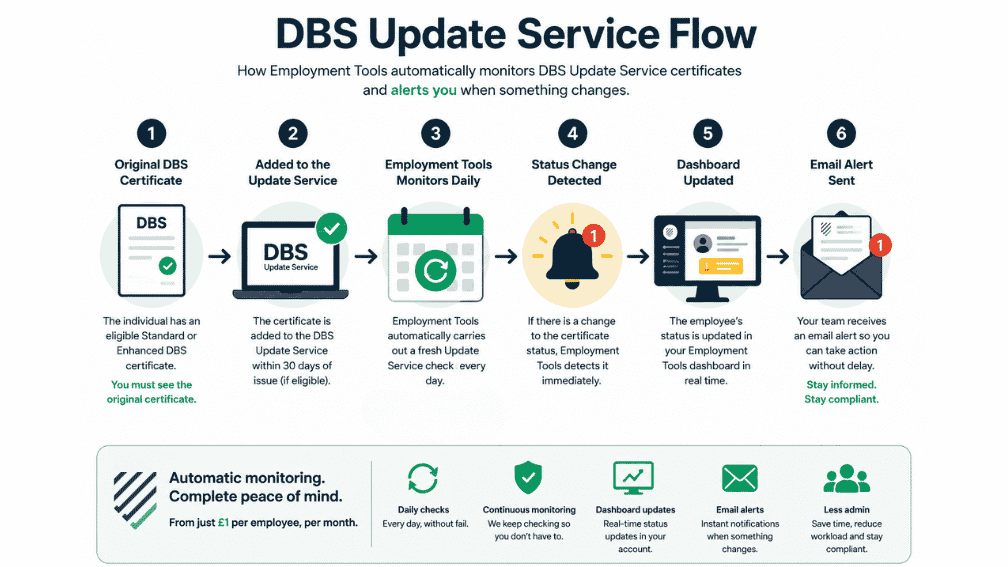
Once an employee is set up for monitoring, Employment Tools takes care of the ongoing DBS Update Service employer checks for you.
Add The Employee
Add the employee and their eligible DBS certificate details to Employment Tools and place them under Update Service monitoring.
If the DBS application was done through Employment Tools, you can request it be added during the application.
We Check Every Day
Our system automatically carries out DBS Update Service status check every day, without your team needing to log in and check manually.
We Monitor For Changes
The employee continues to be checked in the background, giving you continuous monitoring and peace of mind.
You Are Alerted As Soon As Something Changes
Dashboard: the employee’s status is automatically updated in your Employment Tools account.
Email: your team receives an alert as soon as the status change is detected.
Already using Employment Tools for DBS checks?
We can also add eligible DBS certificates to the Update Service for you, helping you manage the process from the original DBS application through to ongoing daily monitoring.
Daily DBS Update Service Monitoring From Just £1 Per Employee, Per Month
For a small monthly cost, Employment Tools takes away the repetitive work of carrying out DBS Update Service employer checks manually and checks your monitored employees every day.
per month
One simple monthly price for automatic daily DBS Update Service checks and ongoing monitoring.
What do you get for £1?
Far more than a single DBS status check. Your employee is placed under ongoing monitoring and our system keeps doing the repetitive work for you.
Who Should Use The DBS Update Service?
The DBS Update Service is particularly valuable for organisations that need ongoing oversight of employees, workers or volunteers whose DBS status remains important after their original certificate has been issued.
Instead of simply carrying out another DBS check at a fixed point in the future, an eligible employer can use the Update Service to check whether the information linked to an existing certificate remains current.
Employment Tools goes further by automating the DBS Update Service employer check every day for the people you choose to monitor.
Care Providers
Useful for care organisations managing employees in roles where DBS status remains an important part of ongoing safeguarding and workforce management.
Schools & Education
Helps schools, colleges and other education providers keep eligible employees under regular DBS status monitoring.
Healthcare Organisations
A useful way to reduce repetitive DBS administration when managing larger healthcare workforces.
Recruitment Agencies
Particularly valuable when supplying and managing large numbers of workers whose DBS status needs ongoing oversight.
Charities & Voluntary Organisations
Helps organisations keep eligible employees and volunteers under DBS monitoring without introducing more recurring administration.
Employers With Larger Workforces
If you are responsible for dozens, hundreds or thousands of DBS-checked people, automatic daily checks can remove a significant amount of manual work.
What Must Employers Check Before Using The DBS Update Service?
An employer cannot carry out a DBS Update Service status check simply because an individual is subscribed. The DBS sets out a number of conditions that must be met before an employer can legally carry out a status check.
You Still Need To See The Original DBS Certificate
If someone is already subscribed to the DBS Update Service when they join your organisation, you cannot simply carry out an online status check. The DBS requires the original paper certificate to have been viewed in person. A copy or viewing the certificate over a video link is not sufficient. Read the official DBS Update Service employer guidance .
Check The Certificate Is Suitable For The Role
Before carrying out a DBS Update Service employer check, make sure the existing certificate is appropriate for the new role. Your organisation must be legally entitled to request the same type and level of DBS check.
Confirm The Applicant’s Identity
The applicant’s identity must have been checked, either as part of the original DBS application or before the status check where the certificate was obtained elsewhere. See the official DBS ID checking guidance .
Have The Applicant’s Consent
You must have the individual’s permission to carry out the status check. DBS also records Update Service checks and the individual can see them through their Update Service account.
Check The Workforce Is Correct
For an Enhanced DBS certificate, the workforce shown must only contain the workforce information your organisation is entitled to know about for the role. The workforces are child, adult and other. See the official DBS eligibility guidance .
Check The Workforce And Barred Lists
The certificate must only contain the workforce information you are entitled to know about for the role. If a Barred List check appears on the certificate, you must also be legally entitled to that specific Barred List information.
For the complete rules, see the DBS Update Service employer guide on GOV.UK .
Once the original certificate requirement, identity check, consent and eligibility conditions have been satisfied, DBS confirms that the original certificate does not need to be physically viewed again for every subsequent status check.
Ready to Make Employment Checks Easier?
Register for free, book a demonstration or speak to our team about your organisation’s requirements.
DBS Update Service FAQs For Employers
Answers to common questions about using the DBS Update Service, carrying out employer checks and using Employment Tools for automatic daily monitoring.
What is the DBS Update Service?
The DBS Update Service is an online subscription service for eligible Standard and Enhanced DBS certificates. It allows an eligible employer or organisation, with the individual’s permission, to carry out an online status check against the certificate.
Can an employer check someone’s DBS Update Service?
Yes, but the employer must meet the DBS requirements for carrying out a status check. This includes having the individual’s consent, being legally entitled to the same level and type of DBS check, and meeting the requirements around the original certificate and identity.
Do I need to see the original DBS certificate before using the Update Service?
Yes. If an individual arrives at your organisation already subscribed to the DBS Update Service, the original paper certificate must have been viewed in person before you rely on a status check.
A photocopy, scan or viewing the certificate over a video call is not sufficient for this requirement.
How often should employers check the DBS Update Service?
DBS does not set one fixed checking frequency for every employer. Organisations should decide on an appropriate schedule based on factors such as the role, level of risk, regulatory requirements and safeguarding policies.
Where ongoing DBS oversight is important, checking as regularly as reasonably possible gives the organisation greater visibility. Employment Tools removes the extra administration by carrying out a fresh check every day for monitored employees.
Does the DBS Update Service automatically notify employers?
No. Employers need to carry out a status check to find out whether the certificate remains current.
Employment Tools solves this by carrying out the check automatically every day. If a monitored certificate changes, the employee’s status is updated in your dashboard and your team receives an email alert.
Can Basic DBS checks be added to the DBS Update Service?
No. The DBS Update Service is for eligible Standard and Enhanced DBS certificates. Basic DBS certificates cannot be added to the service.
How long does someone have to add their certificate to the DBS Update Service?
An eligible DBS certificate must be added to the Update Service within 30 days of the certificate being issued.
If you process DBS checks through Employment Tools, we can also add eligible certificates to the Update Service for you.
Does an employer need the applicant’s consent to carry out an Update Service check?
Yes. The individual must give permission for the employer to carry out a DBS Update Service status check against their certificate.
Can I use any DBS certificate for a new role?
No. The existing certificate must be appropriate for the new role. The employer must be legally entitled to the same level and type of DBS check, including the relevant workforce and any Barred List information shown on the certificate.
How does Employment Tools automate DBS Update Service employer checks?
Once an eligible employee is placed under monitoring, Employment Tools automatically carries out a fresh DBS Update Service employer check every day.
This removes the need for your team to repeatedly log in and carry out routine checks manually.
How quickly will we know if something changes?
Employment Tools checks monitored employees every day. When a status change is detected, the employee’s status is updated in your dashboard and your team is sent an email alert.
How much does automatic DBS Update Service monitoring cost?
Employment Tools automatic monitoring costs £1 per employee, per month.
This includes daily automatic checks, continuous monitoring, dashboard updates and email alerts when a change is detected.
Can Free Admin Credit be used for DBS Update Service monitoring?
Yes. Employment Tools Free Admin Credit can be used towards the £1 per employee monthly monitoring cost. Depending on the amount of credit available, this can reduce the cost or potentially cover it completely.
Want to stop carrying out DBS Update Service checks manually?
Set employees up once and let Employment Tools check their DBS Update Service status every day.
Forward this page!
About The Author

John Schofield-Antoncich
John has processed more applications than days he has been alive, and has become the DBS expert. Got a question? He knows the answer!